기타/LLM

[주얼리 브랜드에 대한 소비자 반응 분석] LLM RAG(검색, 증강, 생성) 코드로 이해하기 ①

baektree 2025. 10. 20. 22:26

LLM RAG 로직을 생성한 코드를 가져왔다.

코드 블록으로 단계별 이해를 해보려 한다.

단, 코드가 하도 길어 다음 흐름도 기준 1번부터 3번까지만 현재 포스팅으로 담아보았다.

4 ~ 6번은 다음시간에!


[코드 블록별 구조화]

  1. 관련 라이브러리 import
  2. 초기 설정 및 데이터 로드
  3. RAG 관련 함수
    ------ 여기까지만  ----------
  4. 구조화된 답변을 출력하기 위한 pydantic 모델 정의
  5. 비동기 분석 및 검증 로직
  6. 메인 실행 블록


1. 관련 라이브러리 import

import os
import asyncio
from dotenv import load_dotenv
import pandas as pd
from typing import List

# LangChain 및 Pydantic 관련 라이브러리
from langchain_google_genai import ChatGoogleGenerativeAI, GoogleGenerativeAIEmbeddings
from langchain_community.vectorstores import InMemoryVectorStore
from langchain_core.prompts import ChatPromptTemplate
from langchain_core.documents import Document
from langchain_core.output_parsers import JsonOutputParser
from pydantic import BaseModel, Field

# 기타 라이브러리
import numpy as np
from tqdm.asyncio import tqdm


📦 Python 표준/유틸리티 라이브러리

더보기
  • os: 운영체제 상호작용을 위한 표준 라이브러리, 환경 변수(os.getenv()) 접근
  • asyncio: 비동기 처리(병렬 처리)
  • dotenv: 환경 변수 관리를 돕는 라이브러리 .env 파일에 저장된 비밀 정보(API)를 읽어와 프로그램의 환경 변수로 로드하여 코드가 아닌 별도 파일로 자격 증명을 안전하게 관리
  • tqdm.asyncio: 비동기 진행 표시줄
  • typing : 타입 힌트 기능을 제공하는 표준 모듈

🧠 LangChain 및 Pydantic 라이브러리

더보기
  • pydantic: 데이터 유효성 검사 및 설정 관리를 위한 라이브러리, 모델(BaseModel)을 정의하여 LLM 출력이나 입력 데이터가 정해진 구조(ExtractionResult)와 타입(Field)을 따르도록 강제하여, 프로그램이 안정적으로 데이터를 파싱할 수 있게 함.
  • langchain_google_genai: LangChain 프레임 워크에서 google의 생성형 ai 모델을 사용하기 위한 통합 모듈
    • ChatGoogleGenerativeAI: 대화(채팅)형 LLM 모델을 호출하여 텍스트 생성 및 분석을 요청
    • GoogleGenerativeAIEmbeddings: 텍스트를 벡터로 변환하여 RAG 시스템의 의미 기반 검색에 사용
  • langchain_community : LangChain에서 제공하는 다양한 외부 도구(벡터 저장소, 로더 등)를 포함하는 모듈
    • InMemoryVectorStore: 데이터를 메모리에 임시로 저장하는 벡터 데이터베이스(Vector Store). RAG 검색을 위해 임베딩된 문서를 저장하고 검색 쿼리와의 유사도를 비교.
  • langchain_core
    • ChatPromptTemplate: LLM에게 전달할 프롬프트 템플릿을 구조화하고 변수를 채워 넣음.
    • Document: LangChain 내에서 처리되는 표준 데이터 단위입니다. 원본 내용(page_content)과 메타데이터(metadata)를 담는 구조체.
    • JsonOutputParser: LLM의 출력(보통 문자열 형태)을 정의된 JSON 구조(Pydantic 모델)에 맞춰 파싱하고, 파싱 실패 시 오류를 처리.


2. 초기 설정 및 데이터 로드

# --- 초기 설정  ---
load_dotenv()
api_key = os.getenv("GOOGLE_API_KEY")

# 파일 경로 
product_name_csv_path = 
output_path = 
CONCURRENT_REQUESTS = 10

# --- 데이터 로드 ---
try:
    product_name_df = pd.read_csv(product_name_csv_path, dtype=str).fillna('')
except FileNotFoundError:
    print(f"경고: '{product_name_csv_path}' 에서 제품 파일을 찾을 수 없습니다.")
    exit()
  • load_dotenv() : .env 파일에서 GOOGLE_API_KEY를 로드
  • CONCURRENT_REQUESTS : 동시 요청수 즉 병렬 처리의 최대 한도를 설정하여 API 요청이 서버나 네트워크에 과부하 주지 않도록 제어
  • except FileNotFoundError: 제품 파일을 찾지 못한 경우, 프로그램이 정상적으로 종료되도록 예외 처리


3. RAG(검색 증강 생성) 관련 함수

LLM이 게시글 분석 시 참고할 수 있는 브랜드/라인 찾기

def make_data_to_documents(df_data: pd.DataFrame) -> List[Document]:
    return [Document(page_content=f"브랜드: {item.get('brand_k', '')}, 라인: {item.get('product_k', '')}, 브랜드_별칭: {item.get('brand_slang', '')}, 라인_별칭: {item.get('product_slang', '')}", metadata={"brand_k": item.get('brand_k', ''), "product_k": item.get('product_k', '')}) for item in df_data.to_dict('records')]

class KeywordSearch:
    def __init__(self, documents: List[Document]):
        self.documents = documents
        self.doc_contents = [doc.page_content.lower() for doc in documents]
    def search(self, query: str, k: int = 10):
        query_keywords = set(query.lower().split())
        scores = [(doc, float(sum(1 for kw in query_keywords if kw in content))) for doc, content in zip(self.documents, self.doc_contents)]
        scores = [s for s in scores if s[1] > 0]
        scores.sort(key=lambda x: x[1], reverse=True)
        return scores[:k]

def create_vector_store(documents: List[Document], embeddings: GoogleGenerativeAIEmbeddings) -> InMemoryVectorStore:
    vector_store = InMemoryVectorStore(embeddings)
    vector_store.add_documents(documents=documents)
    return vector_store

def hybrid_search(query: str, vector_store: InMemoryVectorStore, keyword_searcher: KeywordSearch, k: int = 10):
    semantic_results = vector_store.similarity_search_with_score(query, k=k*2)
    keyword_results = keyword_searcher.search(query, k=k*2)
    def normalize_scores(results):
        if not results: return {}
        scores = np.array([score for _, score in results])
        min_s, max_s = scores.min(), scores.max()
        if max_s == min_s: return {doc.page_content: 0.5 for doc, _ in results}
        return {doc.page_content: (score - min_s) / (max_s - min_s) for doc, score in results}
    semantic_norm = normalize_scores(semantic_results)
    keyword_norm = normalize_scores(keyword_results)
    all_docs = {doc.page_content: doc for doc, _ in semantic_results + keyword_results}
    hybrid_scores = {content: (semantic_norm.get(content, 0) * 0.2) + (keyword_norm.get(content, 0) * 0.8) for content in all_docs}
    sorted_content = sorted(hybrid_scores.items(), key=lambda item: item[1], reverse=True)
    return [all_docs[content] for content, _ in sorted_content[:k]]


(1) 사전 이용해서 List[Document]만들기

더보기
def make_data_to_documents(df_data: pd.DataFrame) -> List[Document]:
    return [Document(page_content=f"브랜드: {item.get('brand_k', '')}, 라인: {item.get('product_k', '')}, 브랜드_별칭: {item.get('brand_slang', '')}, 라인_별칭: {item.get('product_slang', '')}", metadata={"brand_k": item.get('brand_k', ''), "product_k": item.get('product_k', '')}) for item in df_data.to_dict('records')]


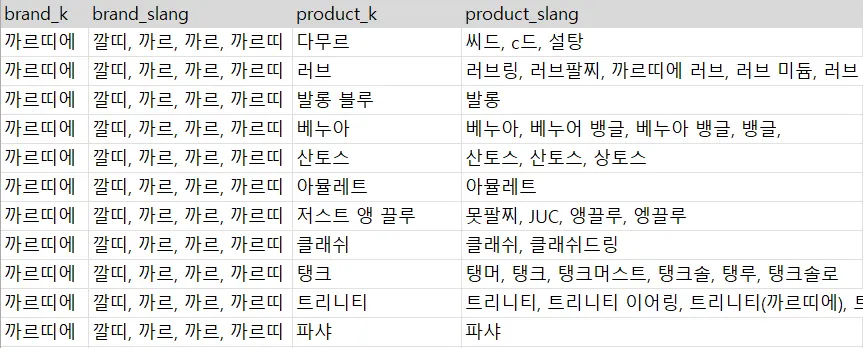
1-1) 구축한 사전 형태

1-2) Documents 만들기

  • DataFrame을 records를 기준으로 딕셔너리로 변형한다.
  • records를 items으로 명명, 한 행씩 순회하는는데 page_content는 RAG 검색에 사용 될 브랜드명, 라인명, 브랜드 별칭, 라인 별칭을 담고 metadata는 실제 추출 후 저장될 표준화된 브랜드명과 라인명을 담는다.
    • page_content : 검색용
    • metadata : 추출용/검증용
  • 이것들을 Document로 만들어 리스트화 한다.
    • Documnet 객체 구조 예시
      Document(
          page_content="""브랜드: 까르띠에, 
      		 라인: 다무르, 
      		 브랜드_별칭: 깔띠, 까르, 까르띠, 
         		라인_별칭: 씨드, c드, 솔팅""",
          metadata={
              "brand_k": "까르띠에", 
              "product_k": "다무르"
          }
      )
    • Document( page_content="""브랜드: 까르띠에, 라인: 다무르, 브랜드_별칭: 깔띠, 까르, 까르띠, 라인_별칭: 씨드, c드, 솔팅""", metadata={ "brand_k": "까르띠에", "product_k": "다무르" } )

(2) 키워드 기반 검색 (정확히 일치하는 키워드가 몇개인지 점수화)

더보기
class KeywordSearch:
    def __init__(self, documents: List[Document]):
        self.documents = documents
        self.doc_contents = [doc.page_content.lower() for doc in documents]
    def search(self, query: str, k: int = 10):
        query_keywords = set(query.lower().split())
        scores = [(doc, float(sum(1 for kw in query_keywords if kw in content))) for doc, content in zip(self.documents, self.doc_contents)]
        scores = [s for s in scores if s[1] > 0]
        scores.sort(key=lambda x: x[1], reverse=True)
        return scores[:k]

2-1) 인스턴스를 땅하고 찍으면 __ init __ (생성자 함수) 실행

  • 인스턴스 속성 documents 를 생성 → 문서 객체 리스트, 구분용 [ doc1…. doc3 ] , 실제 저장은 document 그대로 저장됨.
  • 인스턴스 속성 contents 를 생성 → page_content를 소문자로 만든 리스트 ['...라인: 러브...별칭: 러브링, 러브팔찌...']

2-2) 인스턴스 메서드(기능)를 통해 키워드 기반 점수화 → 상위 k개만 출력

  • 쿼리를 소문자화, 공백으로 구분해서 쪼개기 ex {’까르띠에는', '러브', '팔찌'} ← 검색 쿼리: “까르띠에는 러브 팔찌..”
  • 키워드가 content에 있으면 있을 때마다 1씩 생성
  • socres는 이렇게 [(doc1, 1.0), (doc, 3.0)….] 생김
  • 여기서 점수 기준 내림차순 정렬
  • 점수가 높은 순서대로 리스트안의 요소 k개까지만 출력 

(3) 벡터 저장소 생성

더보기
def create_vector_store(documents: List[Document], embeddings: GoogleGenerativeAIEmbeddings) -> InMemoryVectorStore:
    vector_store = InMemoryVectorStore(embeddings)
    vector_store.add_documents(documents=documents)
    return vector_store

3-1) 텍스트 데이터 → 검색가능한 벡터로 변환 → 메모리에 저장

  • 빈 InMemoryVectorStore 객체, vectore_store를 생성
  • vectore_store에 documents를 벡터화해서 벡터와 원본 문서를 짝지어 메모리에 저장
  • 벡터 저장소 반환
  • 이후 검색 쿼리(사용자 질의)가 들어왔을 때, 가장 유사한 벡터(문서)를 빠르게 찾을 수 있음. 

(4) 하이브리드 검색 : 의미기반, 키워드 기반 서치를 통합 사용

더보기

def hybrid_search(query: str, vector_store: InMemoryVectorStore, keyword_searcher: KeywordSearch, k: int = 10):
    semantic_results = vector_store.similarity_search_with_score(query, k=k*2)
    keyword_results = keyword_searcher.search(query, k=k*2)
    def normalize_scores(results):
        if not results: return {}
        scores = np.array([score for _, score in results])
        min_s, max_s = scores.min(), scores.max()
        if max_s == min_s: return {doc.page_content: 0.5 for doc, _ in results}
        return {doc.page_content: (score - min_s) / (max_s - min_s) for doc, score in results}
    semantic_norm = normalize_scores(semantic_results)
    keyword_norm = normalize_scores(keyword_results)
    all_docs = {doc.page_content: doc for doc, _ in semantic_results + keyword_results}
    hybrid_scores = {content: (semantic_norm.get(content, 0) * 0.2) + (keyword_norm.get(content, 0) * 0.8) for content in all_docs}
    sorted_content = sorted(hybrid_scores.items(), key=lambda item: item[1], reverse=True)
    return [all_docs[content] for content, _ in sorted_content[:k]]

4-1) 하이브리드 서치

  • semantic_results = vector_store.similarity_search_with_score(query, k=k*2)
    • vector_store 객체의 similarity_search_with_scocre메서드를 활용하여 쿼리의 의미적 유사성 검색
    • 이때 [(Document, 유사도 점수)…] 형태로 출력 됨
    • 문서 후보군의 최대 개수는 k*2
    • 예시: [(Doc_A, 0.9), (Doc_B, 0.3)]
  • keyword_results = keyword_searcher.search(query, k=k*2)
    • keyword_searcher의 search 메서드를 활용하여 쿼리의 정확성 검색
    • 이때 [(Document, 키워드 개수)…] 형태로 출력 됨
    • 문서 후보군의 최대 개수는 k*2
    • 예시: [(Doc_A, 2), (Doc_C, 1)]

4-2) 점수 정규화 함수 정의 및 적용

두 검색 방법의 점수(유사도 점수, 키워드 개수)는 단위가 다르므로, 합산하기 전에 0과 1사이의 값으로 통일하는 정규화 과정이 필요

  • semantic_norm : 의미 점수 정규화 / 0~1 사이의 값으로 변환 {doc.page_content: ‘scores’}
  • keyword_norm : 키워드 점수 정규화 / 0~1 사시의 값으로 변환 {doc.page_content: ‘scores’}
  • 검색된 모든 문서의 점수가 동일할 때 각 문서의 중간 값인 0.5 부여하고 정규화 완료

4-3) 문서 통합 및 하이브리드 점수 계산

정규화된 두 점수를 합쳐서 최종적인 ‘하이브리드 점수’를 만듦.

  • all_docs = {doc.page_content: doc for doc, _ in semantic_results + keyword_results}
    • 의미 기반 검색과 키워드 기반 검색에서 나온 모든 문서를 통합화
      • 예시 : [(Doc_A, 0.9), (Doc_B, 0.3), (Doc_A, 0.2), (Doc_C, 0.1)] → {doc.page_content : Doc_A, }
    • 리스트를 순회하며 page_content를 ‘키(key)’로 사용하여 딕셔너리를 만듦. 딕셔너리의 키는 중복될 수 없으므로 Doc_A는 덮어쓰기 되어 한 번만 저장 됨.
      • 예시: all_dos = {doc.page_content : doc(원본 documents 객체)…}
  • hybrid_scores = {content: (semantic_norm.get(content, 0) * 0.2) + (keyword_norm.get(content, 0) * 0.8) for content in all_docs}
    • for content in all_docs : 딕셔너리 순회할 때, 키 값으로 순회 여기서 content는 doc.page_content 문자열을 담게 됨
    • semantic_norm도 page_content를 키로 하여 정규화된 점수를 저장하고 있었으므로, content 키로 접근해야 점수를 정확히 가져올 수 있음
    • 마찬가지로 keyword_norm 딕셔너리에도 동일하게 접근합니다.
    • 가중치 0.2와 0.8을 각각 곱해서 더함
  • sorted_content = sorted(hybrid_scores.items(), key=lambda item: item[1], reverse=True)
    • 최종 {page.content : 점수}가 점수 기준 내림차순으로 정렬됨.
    • 그 결과[('content1', 0.95), ('content2', 0.88), ...] 로 리스트에 담김.
  • return [all_docs[content] for content, _ in sorted_content[:k]]
    • 리스트 요소 상위 k개를 순회하는데 content만 순회하고 이전 단계에서 생성한 all_docs 딕셔너리를 사용하여, 추출된 문서내용을 key로 삼아 실제 document 객체를 찾아 가져옴
    • 찾은 Document 객체들을 리스트 형태로 모아 최종 검색 결과로 반환함.